Orator Dictation System

Orator by Bytescribe
The Orator Dictation System is a multi-line telephone dictation and transcription system. Dictation is recorded over telephone lines and stored as compact voice files. The voice files are then transferred through the Internet to transcriptionists. The system is a reliable alternative to expensive dictation systems.
Dictation Features
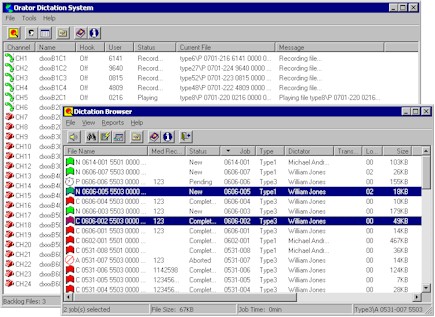
Orator was designed for telephone dictation and transcription workflow. Dictators control recording and playback from the telephone keypad; voice files are stored and transferred to transcriptionists.
- Telephone keypad control: Record, play, rewind, and fast-forward
- Review and edit dictated jobs before marking complete
- Priority options: Save as high priority (stat) or normal priority
- Job type folders: Save dictation under particular job type folders
The Orator Dictation System is a multi-line telephone dictation and transcription system. Dictation is recorded over telephone lines and stored as compact voice files.
The Orator VoIP is dictation software that uses Voice over IP technology to record dictation. Callers can continue to use standard analog telephones or they can use VoIP telephones. The software can be installed on a standard Windows computer with a broadband Internet connection. The Orator VoIP solution requires no hardware or telephone lines. Voice over IP can be far less expensive than standard telephone lines.
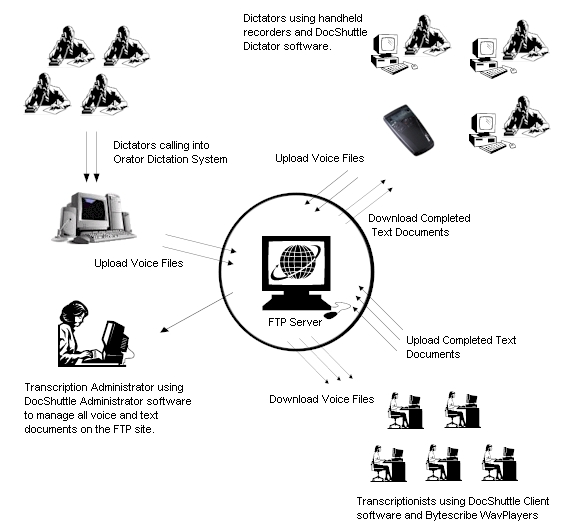
Dictators may control the functions (record, pause, rewind, complete, etc.) with the keypad of the telephone. The Orator seamlessly integrates with the DocShuttle Internet Transcription software to deliver voice files directly to transcriptionists. It also integrates with our WebShuttle online platform.
Orator Dictation Solutions
Orator VoIP
The Orator VoIP version is a software-only solution and requires no hardware or telephone lines. Install on any computer running Microsoft Windows with a broadband Internet connection.
Read MoreAnalog Systems
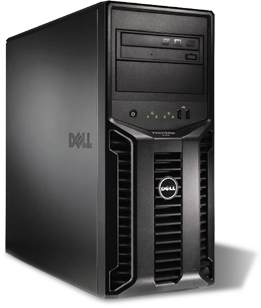
The Orator Digital Dictation System is a multi-line telephone dictation and transcription system. Dictation is recorded over telephone lines and stored as compact voice files.
Read MoreStarter Kits
Software and voice board for installation on a computer running Microsoft Windows. The kit is used with analog telephone lines.
Read MoreOrator VoIP
The Orator VoIP version of the Orator dictation system is a software-only solution and requires no hardware. The Orator VoIP software can be installed on any computer running Microsoft Windows. The software will accept and record telephone calls from most voice-over-IP telephone providers. Bytescribe can recommend reliable and affordable VoIP telephone carriers that are compatible with the Orator system.
Analog Systems
The Orator system was created to run in a Microsoft Windows environment. Voice files can be viewed and searched using standard Windows functions. The only setup requirements are entering user codes for new users. The functions of the system are tailored for dictation and transcription with easy to set preferences. The Orator Dictation software handles tasks such as purging of old files, constant display of system resources, and automatic handling of aborted or completed jobs. The length of time before purging can be customized.
Workflow
Every transcription company needs an organized method for managing transcription workflow. An efficient workflow increases productivity and improves turn around. Bytescribe has developed a simple and affordable model for managing all aspects of the dictation and transcription process. The Orator Dictation System is an essential part of the solution.
Get Orator Dictation
The Orator Dictation System is a reliable alternative to expensive dictation systems. Record over telephone lines and transfer voice files through the Internet to transcriptionists.
Support
Why Orator?
Multi-line telephone dictation with VoIP or analog. Integrates with DocShuttle and WebShuttle for complete workflow.
Solutions
Orator VoIP (software-only), Analog Systems, or Starter Kits. Choose the option that fits your organization.
Learn More