DocShuttle Dictator

DocShuttle Dictator
The DocShuttle Dictator module is designed for use by a single dictating physician. DocShuttle Dictator has many of the features of DocShuttle Administrator, but is limited to viewing files for one particular job type or user ID. The DocShuttle Dictator module allows automatic importing of voice files from handheld recorders, automatic uploading of voice files to an FTP site, and automatic downloading of completed text documents from the FTP site. The status of every job is displayed for the user of the system. The status of each job is shown as either new, downloaded by transcriptionist, completed by transcriptionist, or completed with attached document. All files can automatically be securely encrypted with 256 bit encryption. Completed text documents are downloaded as they are completed by transcriptionists.
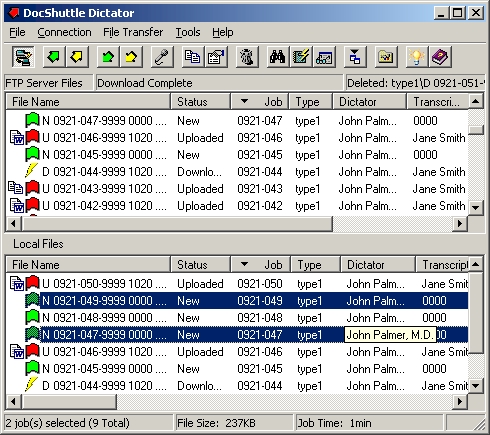
Two Panes, Simple Interface
The DocShuttle window has two panes. The top pane displays files on the FTP server. The bottom pane displays files on the local computer hard drive. Files can be uploaded to the FTP server either by dragging files from the bottom pane to the top pane or by clicking the arrows in the button bar at the top of the window. Uploading can also be automated. All files, including both audio and document files, can automatically be securely encrypted with 256 bit encryption.
See DocShuttle Dictator in Action
Try DocShuttle
DocShuttle Dictator gives dictating physicians a simple, secure way to manage voice files and completed documents. Affordable and reliable.
Support
Why Dictator?
Automatic import from handheld recorders, upload to FTP, and download of completed documents—all with 256-bit encryption and clear job status.
Get Started
Download a free trial or purchase DocShuttle to manage your dictation and transcription workflow.
Free Trial